
How to install ttf or otf font to OS XКак добавить в OS X шрифт ttf, otf

Made a decision to write an article in notabene style. Otherwise I always forget and then painfully recall the solution of this issue I’d like to tell about. And the thing I’d like to about is how to install a font to Max OS X system, e.g. ttf (true type font) or otf (open type font). I didn’t find it in standard Settings App (maybe didn’t try too much:).Решил вот накидать небольшую статью в стиле nota bene, иначе каждый раз мучительно вспоминать приходится. А рассказать я хотел, как установить в Mac OS X дополнительный шрифт, например, в формате ttf (True Type Font) или otf (Open Type Font). В стандартных настройках я такого не нашел, может плохо искал) Но вот гугл подсказывает иные вещи. Может кому-то окажется полезным.
The trick is that you need to put font files to special folder which is /Library/System. If system language is not an English this folder may have specific name and look different in Finder app. In Russian it calls /Библиотека/Штрифты. The most difficult thing in all of this is how to get an access to Fonts folder using standard Finder App, because by detault it does’t show a number of folders considering them as system important I believe. So we just need to use standard Go To Folder facility. Just Open system menu of Finder app and choose Go To -> Go To Folder
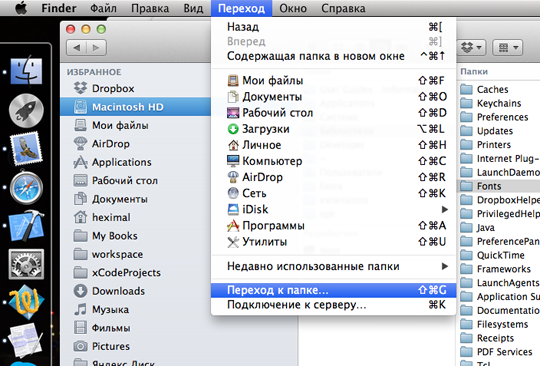
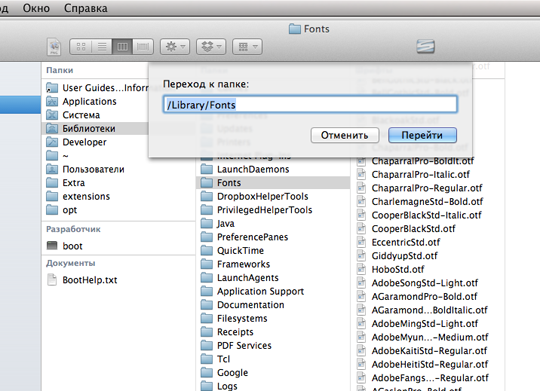
Then piece of cake. Put /Library/Fonts string into spefcial field and press Go To
Copying all ttf-font files, I hope received from some legal source of course)
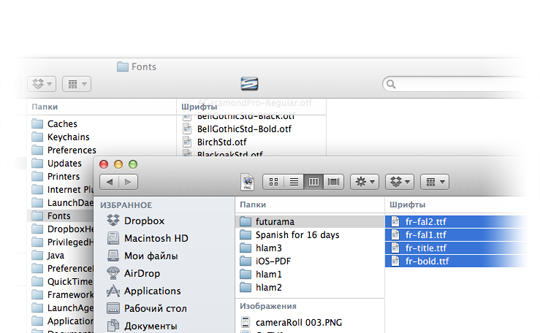
And voila. The fonts must appear imediately in all system font-dialogs if installation finished OK of course.
Нужно положить /Library/Fonts (если у вас в MaxOS X установлена русская локализация, папка может в Finder выглядеть как /Библиотека/Штрифты). Самое сложно в этом все, это то, что по умолчанию эту папку нельзя увидеть стандартной программой Finder (с помощью Far Manager ясное дело все видно:). Весь трюк в том, чтобы использовать возможность самого приложения Finder — это Перейти к папке. Получить доступ к этой функции можно из системного меню Finder:
Далее дело техники. Прописываем в нужном поле /Library/Fonts и нажимаем Перейти
Копируем файлы ttf-шрифтов, раздабуденных праведным образом конечно же, в папку /Library/Fonts
B вуаля! Шрифты моментально должны появиться во всех диалогах выбора шрифта системы, если конечно инсталляция прошла успешно.
Ээээ… /Applications/Utilities/Fonts.app?
Там создать группу шрифтов «Windows» и просто импортировать.
Шрифт Consolas из Win7+ настолько хорош, что имхо конкурирует с Monaco и Menlo…