
iTunesConnect: storing sales reports to databaseiTunesConnect: сохранение в базу отчетов о продажах

Recently I’ve faced the problem of populating different statistics from iTunesConnect portal. Mostly I was intrested in getting full downloading statistics. The iTunesConnect portal provides user with ability of viewing and downloading weekly sales reports only for last three monthes and daily reports only for last month which means the oldest stat is simply getting lost. The solution is obvious: we need to create some mechanism which would populate data and save it to database everyday. After implementing main routine we can enjoy with making different decorations such as visualizing and analytics. Besides, we can easily save current application states which can be useful if some of apps are in state of Wating for review. Озадачился я недавно проблемой сбора различной статистики в iTunesConnect. В большей степени хотелось иметь быстро доступную и что важнее, полную статистику скачиваний. Портал iTunesConnect дает возможность просматривать и скачивать недельные sales reports за последние три месяца, а дневные за последний месяц. Таким образом, со временем часть статистики теряется, что не есть хорошо. Решение напрашивается само: создать некий механизм, который будет ежедневно собирать данные и сохранять их в базу. Далее уже можно всякие красивости наводить типа визуализации/аналитики. Ко всему прочему, можно попутно сохранять текущее состояние приложений, что может быть полезно, если какие-либо приложения в состоянии Waiting For Review.
Thinking about the problem, I’ve been researching if there some compete solutions exists, but unsusccessfully, looks like nobody cares about it. There are lot of native iOS apps that allow to observe you app right from the device. Easy? Agrre, but for some reasons I’m not happy with that solution. First of all because of local data storage. I prefer to store data centralized and to have full control. Besides, I don’t like the restrictions of third-party applications which you can’t remove. Also these apps can’t provide sales reports data ingerity because in order to provide it you should run the app everyday — in iOS no background jobs are permitted.
Well, let it be. Let’s produce our automatic iTunesConnect scraper. Scraping is the process of collecting data from public source such as web site. Different search engines bots (like google bots) which do indexing of all world wide web can be represented as an example of scraper. Our scraper will index only one site — http://itunesconnect.apple.com.
[ad#inline_post]
Looking ahead, the result can be presented as follows (the image is clickable):
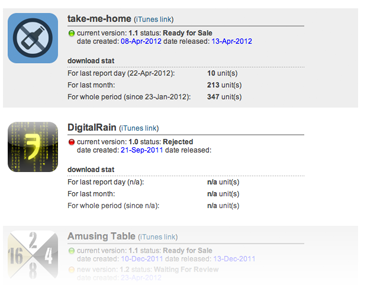 There is no public itunesconnect API due to some political reasons so we’ll have to reproduce all user’s actions perfomed in web browser, such as authorization, clicking certain links, saving downloaded reports.
In fact, how it can be implemented? There are two ways of doing this. If the site is based on classic HTTP GET/POST it can be achived by analyzing web pages content. But there are less classic sites today, moreover itunesconnect doesn’t belong to them. Nowadays javascript and ajax rule. Besides, here comes HTML5 epoch.
It’s very hard to analyze all the ajax mechanics — learning a dozens miles of javascirpt code is not for nervous people. In this situation http sniffing can be much more helpful. Let’s take our favorite sniffer tool and see what browser transfers to server and what server is responding when user do certain actions. All that’s left to do is reproduce this process programmatically. iTunesConnect has modern web2.0 interface and that’s why it doesn’t make sense to analyze its javascript part. From other side http sniffing is not useful for 100% because the portal uses HTTPS (secured) protocol and all data is being encrypted. All we can see in sniffer tool is some binary garbage. What can be done? The solution was found by me in one of my less favorite browser FireFox. There is a beautiful plugin which calls temperdata.
I don’t want to describe in details the entire source, I hope it’s well enough commented. You can download PHP iTunes scraper here (this time I decided to upload sources to google repository)
For applications states and reports storage we need to create two tables:
CREATE TABLE  `apps`.`itc_apps` (
  `Title` varchar(255) NOT NULL DEFAULT '',
  `SKU` varchar(255) NOT NULL DEFAULT '',
  `BundleId` varchar(255) NOT NULL DEFAULT '',
  `AppleId` varchar(64) NOT NULL DEFAULT '',
  `AppType` varchar(64) NOT NULL DEFAULT '',
  `DefaultLanguage` varchar(64) NOT NULL DEFAULT '',
  `AppstoreLink` varchar(255) NOT NULL DEFAULT '',
  `cver_version` varchar(16) DEFAULT NULL,
  `cver_status` varchar(32) DEFAULT NULL,
  `cver_status_color` varchar(16) DEFAULT NULL,
  `cver_date_created` int(11) DEFAULT NULL,
  `cver_date_released` int(11) DEFAULT NULL,
  `nver_version` varchar(16) DEFAULT NULL,
  `nver_status` varchar(32) DEFAULT NULL,
  `nver_status_color` varchar(16) DEFAULT NULL,
  `nver_date_created` int(11) DEFAULT NULL,
  `nver_date_released` int(11) DEFAULT NULL,
  `creation_date` int(11) NOT NULL DEFAULT '0',
  `update_date` int(11) NOT NULL DEFAULT '0',
  PRIMARY KEY (`Title`,`BundleId`)
) ENGINE=MyISAM DEFAULT CHARSET=utf8
CREATE TABLE  `apps`.`itc_sales` (
  `Provider` varchar(255) NOT NULL DEFAULT '',
  `ProviderCountry` varchar(255) NOT NULL DEFAULT '',
  `SKU` varchar(255) NOT NULL DEFAULT '',
  `Developer` varchar(255) NOT NULL DEFAULT '',
  `Title` varchar(255) NOT NULL DEFAULT '',
  `Version` varchar(255) NOT NULL DEFAULT '',
  `ProductTypeIdentifier` varchar(255) NOT NULL DEFAULT '',
  `Units` int(11) NOT NULL DEFAULT '0',
  `DeveloperProceeds` float NOT NULL DEFAULT '0',
  `BeginDate` int(11) NOT NULL DEFAULT '0',
  `EndDate` int(11) NOT NULL DEFAULT '0',
  `CustomerCurrency` varchar(255) NOT NULL DEFAULT '',
  `CountryCode` varchar(255) NOT NULL DEFAULT '',
  `CurrencyOfProceeds` varchar(255) NOT NULL DEFAULT '',
  `AppleIdentifier` varchar(255) NOT NULL DEFAULT '',
  `CustomerPrice` float NOT NULL DEFAULT '0',
  `PromoCode` varchar(255) DEFAULT NULL,
  `ParentIdentifier` varchar(255) DEFAULT NULL,
  `Subscription` varchar(255) DEFAULT NULL,
  `Period` varchar(255) DEFAULT NULL,
  `creation_date` int(11) NOT NULL DEFAULT '0',
  `update_date` int(11) NOT NULL DEFAULT '0'
) ENGINE=MyISAM DEFAULT CHARSET=utf8
itc_scraper.php script performs data collecting. In order to use it you need to configure config.php file. There you can specify such parameters as database credentials, iTunes logins list, the list of applications you’d like to monitor. The script also creates on the disk agregated data snapshot. The information is stored in `meta` folder in form of serialized php-objects so there is no need to establish db-connection each time the script is accessed by user browser. Неrе is an example of how I designed the data visualization. This script uses only data from `meta` folder.
P.S. Now I’m thinking about composing simple iOS-application which will do server request and display recevied data. There is no need to create some complecated parse routines in Objective-C, we can receive complete html code and display it in standard UIWebView component. We can also improve this idea e.g. by implementing the concept of repositories. For instance, we could keep the stat from different sets of iTunes logins. That could be useful, e.g. if you have your personal iTunes account and account of your employer — I wouldn’t like to show my data to some sales guys)) Обдумывая задачу я, естественно, проводил поиски готовых решений, но как-то не сказать, чтобы успешно — почему-то эта идея мало кого заботит. Хотя есть целый пресс iOS-приложений, которые позволяют все это наблюдать прямо со своего девайса. Удобно? Не спорю. Но меня не устраивает ограниченность функционала (всегда проще сделать самому и не ограничивать себя ни в чем), а также локальность хранения данных. Не знаю почему, но мне спокойнее, когда данные хранятся централизовано, и когда я имею над ними полный контроль. К тому же такое приложение может обеспечить целостность отчетов только в том случае, если постоянно запускать ее хотя бы раз в день. Иначе в бэкграунде никаких обновлений происходить не может. И так, решено, будем делать iTunesConnect scraper. Scrapping — модное словечко (от англ. to scrape — соскребать), означающее процесс сбора информации из общедоступного источника, такого, как веб-сайт. Ярким примером скрейпера могут служить поисковые роботы типа Google и Яндекс, которые индексируют веб-сайты всего интернета. Наш робот будет индексировать всего один сайт — http://itunesconnect.apple.com.
[ad#inline_post]
Забегая вперед, в конечном виде это все может выглядеть так (изображение кликабельно): Публичного API itunesconnect не предоставляет по политическим соображениям, поэтому нам придется программного воспроизводить действия пользователя в браузере, то есть, авторизоваться в системе, распарсить ответ, кликнуть нужные ссылки, скачать контент, опять его распарсить и сложить в базу. Как вообще реализуются подобное? Если сайт не очень сложный, основанный на классическом HTTP GET/POST, то можно методом анализа контента веб-страниц. Но таких сайтов в современности уже практически не осталось, и уж тем более портал iTunesConnect не из их числа. Сейчас балом правят javascript, ajax, а также наступает эпоха HTML5. Анализировать всю механику ajax’a классическим способом очень сложно — изучение километров javascript’а занятие не для слабонервных. В этой ситуации на помощь приходит второй метод — синффинг. Берем в руки любимую сниффер-утилиту (для прослушки сетевого трафика), производим в браузере необходимые действия, смотрим, что браузер отсылает на сервер, и что сервер ему возвращает. Далее воспроизводим все это программно. iTunesConnect имеет современный web2.0 интерфейс, поэтому вариант с анализом javascript отпадает сразу. Однако и сниффинг также не 100% вариант, поскольку портал работает по HTTPS(secured), а это значит, что весь трафик шифруется асимметричным ключом, поэтому в снифере мы увидим бессмыслицу. Что делать? Я нашел решение в неочень мною любимом FireFox. Для него написан хороший плагиин temperdata. Ну а дальше дело техники. Не буду расписывать подробно код, надеюсь, он достаточно прокомментирован и не вызовет затруднений. Скачать PHP iTunes scraper можно здесь (решил в этот раз залить проект в репозиторий code.google.com — смотрю, это модно). Для хранения информации о приложениях и отчетов в базе нам понадобится пара таблиц:
CREATE TABLE  `apps`.`itc_apps` (
  `Title` varchar(255) NOT NULL DEFAULT '',
  `SKU` varchar(255) NOT NULL DEFAULT '',
  `BundleId` varchar(255) NOT NULL DEFAULT '',
  `AppleId` varchar(64) NOT NULL DEFAULT '',
  `AppType` varchar(64) NOT NULL DEFAULT '',
  `DefaultLanguage` varchar(64) NOT NULL DEFAULT '',
  `AppstoreLink` varchar(255) NOT NULL DEFAULT '',
  `cver_version` varchar(16) DEFAULT NULL,
  `cver_status` varchar(32) DEFAULT NULL,
  `cver_status_color` varchar(16) DEFAULT NULL,
  `cver_date_created` int(11) DEFAULT NULL,
  `cver_date_released` int(11) DEFAULT NULL,
  `nver_version` varchar(16) DEFAULT NULL,
  `nver_status` varchar(32) DEFAULT NULL,
  `nver_status_color` varchar(16) DEFAULT NULL,
  `nver_date_created` int(11) DEFAULT NULL,
  `nver_date_released` int(11) DEFAULT NULL,
  `creation_date` int(11) NOT NULL DEFAULT '0',
  `update_date` int(11) NOT NULL DEFAULT '0',
  PRIMARY KEY (`Title`,`BundleId`)
) ENGINE=MyISAM DEFAULT CHARSET=utf8
CREATE TABLE  `apps`.`itc_sales` (
  `Provider` varchar(255) NOT NULL DEFAULT '',
  `ProviderCountry` varchar(255) NOT NULL DEFAULT '',
  `SKU` varchar(255) NOT NULL DEFAULT '',
  `Developer` varchar(255) NOT NULL DEFAULT '',
  `Title` varchar(255) NOT NULL DEFAULT '',
  `Version` varchar(255) NOT NULL DEFAULT '',
  `ProductTypeIdentifier` varchar(255) NOT NULL DEFAULT '',
  `Units` int(11) NOT NULL DEFAULT '0',
  `DeveloperProceeds` float NOT NULL DEFAULT '0',
  `BeginDate` int(11) NOT NULL DEFAULT '0',
  `EndDate` int(11) NOT NULL DEFAULT '0',
  `CustomerCurrency` varchar(255) NOT NULL DEFAULT '',
  `CountryCode` varchar(255) NOT NULL DEFAULT '',
  `CurrencyOfProceeds` varchar(255) NOT NULL DEFAULT '',
  `AppleIdentifier` varchar(255) NOT NULL DEFAULT '',
  `CustomerPrice` float NOT NULL DEFAULT '0',
  `PromoCode` varchar(255) DEFAULT NULL,
  `ParentIdentifier` varchar(255) DEFAULT NULL,
  `Subscription` varchar(255) DEFAULT NULL,
  `Period` varchar(255) DEFAULT NULL,
  `creation_date` int(11) NOT NULL DEFAULT '0',
  `update_date` int(11) NOT NULL DEFAULT '0'
) ENGINE=MyISAM DEFAULT CHARSET=utf8
Сбором информации занимается скрипт itc_scraper.php. Для работы необходимо сконфигурировать файл config.php. Здесь можно указать параметры подключения к базе данных, список логинов для iTunesConnect со списком наблюдаемых приложений, а также еще некоторые вещи (описание есть внутри). Сам скрипт помимо сохранения данных в базу создает на диске агрегированный срез данных. Информация хранится в папке meta в виде сериализованных php-объектов, таким образом, для веб-скрипта визуализации не требуется подключения к базе — вот такая у меня прихоть. Вот пример того, как я оформил визуализацию. Скрипт пользуется только данными из папки meta. пс. Сейчас подумываю написать вслед простенькое iOS-приложеньице, которое будет обращаться на сервер за данными и отображать их. Не надо городить сложный парсиинг на Objective-C. Если фантазировать, можно прикрутить концепцию репозиториев, чтобы можно было наблюдать за разными множествами логинов/приложений. К примеру, мне было бы удобно раздельно держать статистику для аккаунтов по работе и своих собственных, поскольку по работе смотрят еще и менеджеры по продажам, а давать им инфу по своим делам мне совсем ни к чему))
Hi!
I’m trying to make your code work, actually it DID work but I have a problem I can only see 9 apps out of 11 in DB but I get the sales for ALL 11 apps in files. How can that be?
Btw, I am creating a JSON exporter from DB, that would be easy to put in a UIWebView with a personalized style, as soon as I have it I’ll pass it back to you.
Let me know how to fix the 9 out of 11 apps.
Hello.
I have one idea regarding this. The thing is that the parser goes to «Manage Your Applications» page from dashboard after signing in. The apps on this page are splitted to pages (10 apps per page). I did’t have itunes accounts with number of apps greater than 10 before so the situation was not handled. I think the issue can be fixed if we get «See all» page where all apps are on single page. And then parse and grab each entry.
I’ll try to make changes asap.
Hi, nice code. To bad it doesn’t work though. This would have really saved me a lot of programming. A very bad move from apple not make something more common for this too.
connection established
processing login myitunesconnectaccount
processing login myitunesconnectaccount failed
removing temp cookie files *******************
ALL DONE!
Logins processed: 1
Logins Successfully processed: 0
My entered data is obviously right. Guessing it has to do with recent changes made by Apple?
@Thorazine: Thanks for a feedback. Try to set «debug» option to true (config.php line 53 in original distributive archive) and then let me see your extended output.
app icon pattern not found for 1.5
they added » ios» to the div class
$pat=’/[\s]*[\s]*[\s]*/si’;
@Adrian
v1.5 (app icon pattern not found)
file: itc_scraper.php
line: 90
class=»app-icon ios»
width=»120″ height=»120″
Hi. Thanks for feedback.
My deepest apologises, I didn’t commit recent changes to repository, there were many changes including the issue you’ve described.
I’m gonna upload new build asap and then let you know it’s available for downloading.
Hi i’m trying to make the code work, but i got this message
BASE_META_DIR is not defined. assigned to script dir C:\Program Files (x86)\EasyPHP-DevServer-13.1VC9\data\localweb\projects\itc/meta/ DB connection established processing login myitunesconnectaccount
Fatal error: Maximum execution time of 100 seconds exceeded in C:\Program Files (x86)\EasyPHP-DevServer-13.1VC9\data\localweb\projects\itc\http_utils.php on line 110
Ps: i tried to extend the execution time from but i didn’t work
Can i get some help
Best Regards . Karim
Hello.
Seems like you’re running the script by accessing it via browser.
If so you probably have to make some changes to your php.ini — the execution time limit is set there.
Is it working ?
I have a similar problem to Thorazine
The script does not enter into Itunes despite the fact that the user / password are correct
Hi,
I am getting following error while executing from terminal window. Can you help in fixing it.
DB connection established
processing login myitunesconnectaccount
>>> getting url https://itunesconnect.apple.com/WebObjects/iTunesConnect.woa url got
ok. auth url: /WebObjects/iTunesConnect.woa/wo/0.0.1.11.3.15.2.1.1.3.1.1
>>> getting url https://itunesconnect.apple.com/WebObjects/iTunesConnect.woa/wo/0.0.1.11.3.15.2.1.1.3.1.1 with postvars={«theAccountName»:»»,»theAccountPW»:»»} url got
auth OK
error: Sign out form not found
processing login myitunesconnectaccount failed
removing temp cookie files
*******************
ALL DONE!
Logins processed: 1
Logins Successfully processed: 0
Does this still work presently in 2015? I configured it and the login fails :/