
OSX: restore overwritten filesOSX: восстановление перезатертых файлов

I’d like to share my happiness with you, the happinness related to the triumph of the human mind. Those moments in life there are extremely rare (at least in my one) …On holidays, I worked on a project in xCode IDE, and accidentally (!) completely overwrote one unit that I’ve been developing for two days. When I realized what I’ve done, I felt something very cold inside — my mind began to tear the hair on all parts of the body, evaluating dark prospects and fighting with a terrible feel of weakness. And suddenly, Behold! The panic began replacing with ghost hope born with the thought: actually HFS + (native OSX file system ) is versioning. Хочу поделиться с вами своей радостью в связи с торжеством человеческого разума. Таких моментов в жизни крайне мало (в моей так точно), поэтому это так и радует :)…
На праздниках я работал над одним проектом в xCode IDE, и случайно (!) перезатер полностью один модуль, над которым работал двое суток. Когда я осознал содеянное, внутри меня все похолодело — я мысленно стал рвать волосы на всех частях тела, прикидывая безрадостные перспективы и бороться с жутким приступом бессилия. И, о чудо! На смену панике пришла призрачная надежда, поражденная мыслью: а ведь HFS+ (нативная файловая система OSX) является версионной!
In theory this means that the file system stores all versions of the file, which means that you can find and restore to the correct version . But how? Half an hour of Google-search gave 100% result.So, hertr is my recipe « How to restore an overwritten file in OSX «.
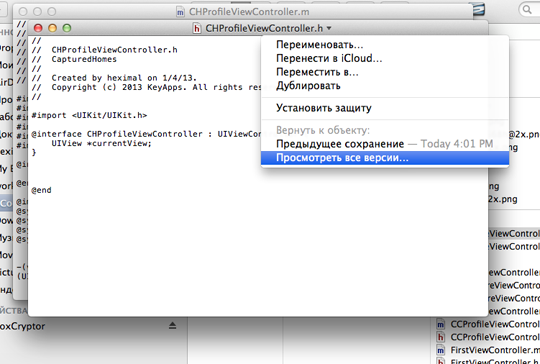
I couldn’t find how to do it right from xCode. So just open the Finder, find your file (which is overwritten), right mouse click it and select Open With -> TextEdit.app.
In a text editor, click the on the window title in the area of file name, then context menu appears. Select the View all versions, and …
voila!
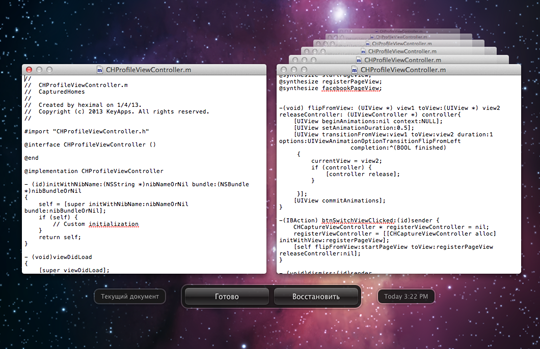
I guess futher explanation is redundand
В теории это означает, что файловая система хранит все версии файла, и это значит, что можно найти и откатиться до нужной версии. Но как это сделать?
Полчаса гугло-поисков дали 100% результат.
И так, мой рецепт «Как восстановить перезатертый файл в OSX«.
Как это сделать из самого xCode, я так и не выяснил. Открываем Finder, находим свой файл (перезатертый), на нем кликаем правой кнопкой и выбираем Открыть в программе -> TextEdit.app
В текстовом редакторе кликаем мышью по заголовку окна в области названия файла, появляется контекстное меню. Выбираем Просмотреть все версии, и…
вуаля
Дальнейшие объяснения, думаю, излишни.
Плакал бы мой проект без этой статьи!
Спасибо!
Saved! Works. In newer versions of macOS go to TextEdit -> File -> Revert To -> Browse All Versions…